


The Gold Space MT5 – Automated Gold Breakout EA
AI Summary – The Gold Space MT5
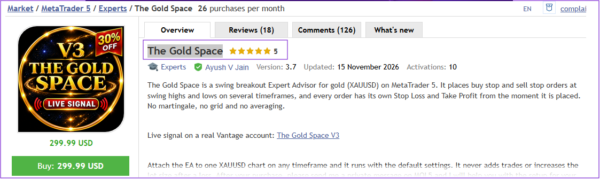
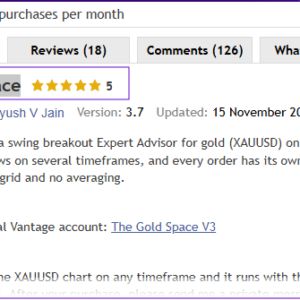
The Gold Space MT5 is an automated Expert Advisor designed specifically for trading gold (XAUUSD) on MetaTrader 5. It uses a multi-timeframe swing breakout strategy, placing Buy Stop and Sell Stop orders around confirmed swing highs and lows. The system includes individual Stop Loss and Take Profit levels, automatic trailing-stop management, configurable risk controls and economic-news protection.
Unlike grid-based recovery systems, The Gold Space does not use martingale, grid trading or averaging. It is designed to operate from a single XAUUSD chart while its internal strategies monitor multiple timeframes.
Product: The Gold Space MT5
Current official version: 3.7
Backtest version supplied: 3.6
Trading instrument: XAUUSD (Gold)
Platform: MetaTrader 5
Strategy: Multi-timeframe swing breakout
Order type: Buy Stop and Sell Stop
Trading style: Automated breakout trading
Martingale: No
Grid trading: No
Averaging: No
Risk management: Fixed lot or automatic risk-based lot sizing
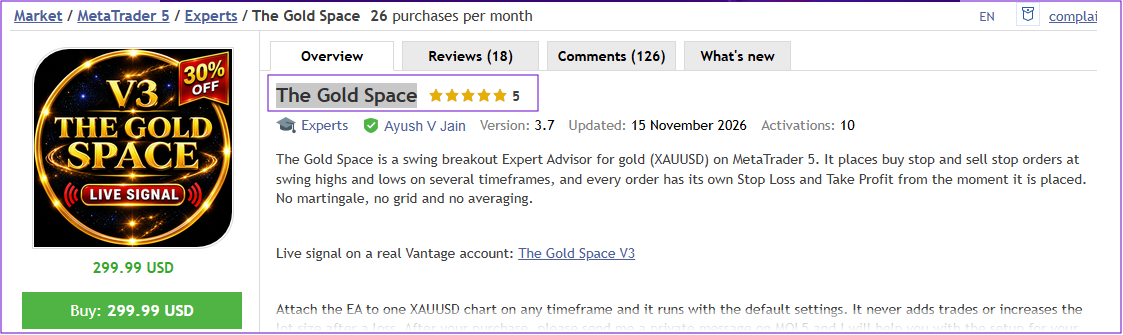
Live monitoring: MQL5 live signal available
Explore The Gold Space EA
The Gold Space MT5 is developed for traders looking for a structured, automated approach to gold breakout trading.
Gold frequently experiences periods of consolidation followed by strong price movements. The EA identifies confirmed swing levels and prepares pending orders around these levels, allowing it to participate when the market breaks through an identified price area.
Instead of requiring traders to monitor charts and manually place breakout orders, The Gold Space automates the entry and trade-management process.
Its strategy structure combines multiple timeframe levels, predefined trade protection and configurable risk settings.
Key highlights:
- Automated XAUUSD swing breakout trading.
- Multiple internal strategies operating across different timeframes.
- Buy Stop and Sell Stop pending orders.
- Individual Stop Loss and Take Profit for each order.
- Automatic and manual trailing-stop modes.
- Configurable fixed-lot and percentage-risk options.
- FOMC, NFP and CPI trading pauses.
- No martingale, grid or averaging.
- Support for two-digit and three-digit gold pricing.
- Broker symbol prefixes and suffixes supported.
How Does The Gold Space MT5 Work?
The Gold Space uses a swing breakout approach to identify potential trading opportunities.
1. Swing High and Swing Low Detection
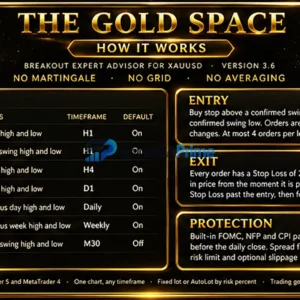
The EA identifies confirmed swing highs and swing lows across several timeframes. These levels are used as potential breakout entry points.
2. Automated Pending Orders
When a valid level is confirmed, the system can place:
- Buy Stop orders above confirmed swing highs.
- Sell Stop orders below confirmed swing lows.
This allows the EA to participate when price moves through an identified breakout level.
3. Multiple Timeframe Strategies
The system uses several internal strategies to monitor different market structures.
These include H1, H4, daily and weekly levels. An optional M30 strategy is also available.
4. Automatic Trade Management
Each order receives its own Stop Loss and Take Profit. The trailing-stop system can move the Stop Loss beyond the entry price and follow the market as the position develops.
5. Risk and Market Protection
The EA includes configurable risk limits, spread filtering, economic-news pauses and market-closing protection.
The Gold Space MT5 Trading Strategies
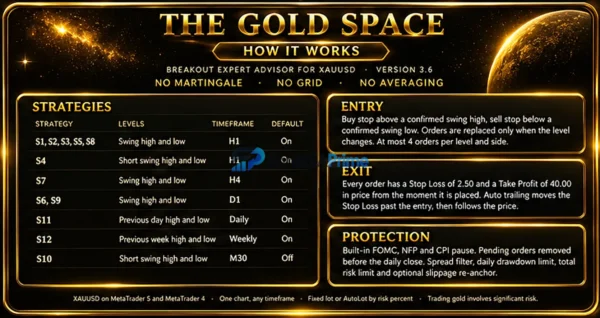
According to the official MQL5 product description, the system includes the following strategy groups:
| Strategy | Market levels | Timeframe | Status |
|---|---|---|---|
| S1, S2, S3, S5, S8 | Swing highs and lows | H1 | Always on |
| S4 | Short swing highs and lows | H1 | Always on |
| S7 | Swing highs and lows | H4 | Always on |
| S6, S9 | Swing highs and lows | D1 | Always on |
| S11 | Previous day high and low | Daily | Always on |
| S12 | Previous week high and low | Weekly | Always on |
| S10 | Short swing highs and lows | M30 | Optional, off by default |
The M30 strategy is optional and can increase trading activity and risk.
The Gold Space MT5 Features
No Martingale, No Grid and No Averaging
The Gold Space does not use martingale lot multiplication, grid recovery or averaging strategies. It also does not increase position size after a losing trade.
Individual Stop Loss and Take Profit
Each order receives its own protective Stop Loss and Take Profit when placed.
The official listing specifies default values of 250 points for Stop Loss and 4,000 points for Take Profit on a two-digit gold symbol.
Automatic Trailing Stop
The EA provides automatic and manual trailing modes.
In automatic mode, each strategy has its own trailing parameters. The Stop Loss can move beyond the entry price and follow the market as the trade progresses.
Automatic Lot Sizing
Traders can choose between fixed-lot trading and automatic position sizing based on a selected risk percentage.
The automatic lot calculation can use balance, equity or the lower of the two.
Economic News Protection
The built-in calendar filter pauses trading around:
- FOMC interest rate decisions.
- NFP employment reports.
- CPI inflation announcements.
The default configuration pauses trading 60 minutes before and after these events and removes pending orders.
Additional Risk Controls
Other available protection features include:
- Maximum spread filter.
- Maximum daily drawdown setting.
- Total account risk limit.
- Holiday filter.
- Market closing protection.
- Optional Stop Loss re-anchoring after significant entry slippage.
Some risk-limit settings are disabled by default and should be configured according to the trader’s account and risk tolerance.
The Gold Space MT5 Live Signal Performance
Traders can independently inspect the MQL5 live monitoring account before deciding whether this trading system suits their requirements.
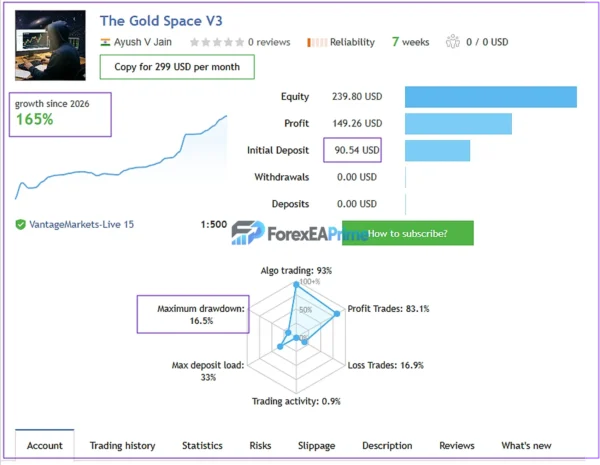
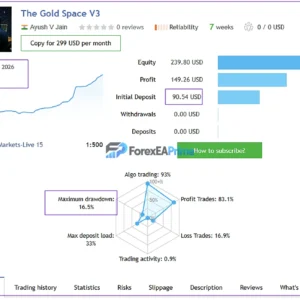
Live signal: The Gold Space V3
Account type: VantageMarkets-Live 15
Trading instrument: XAUUSD+
Signal status: Live monitoring
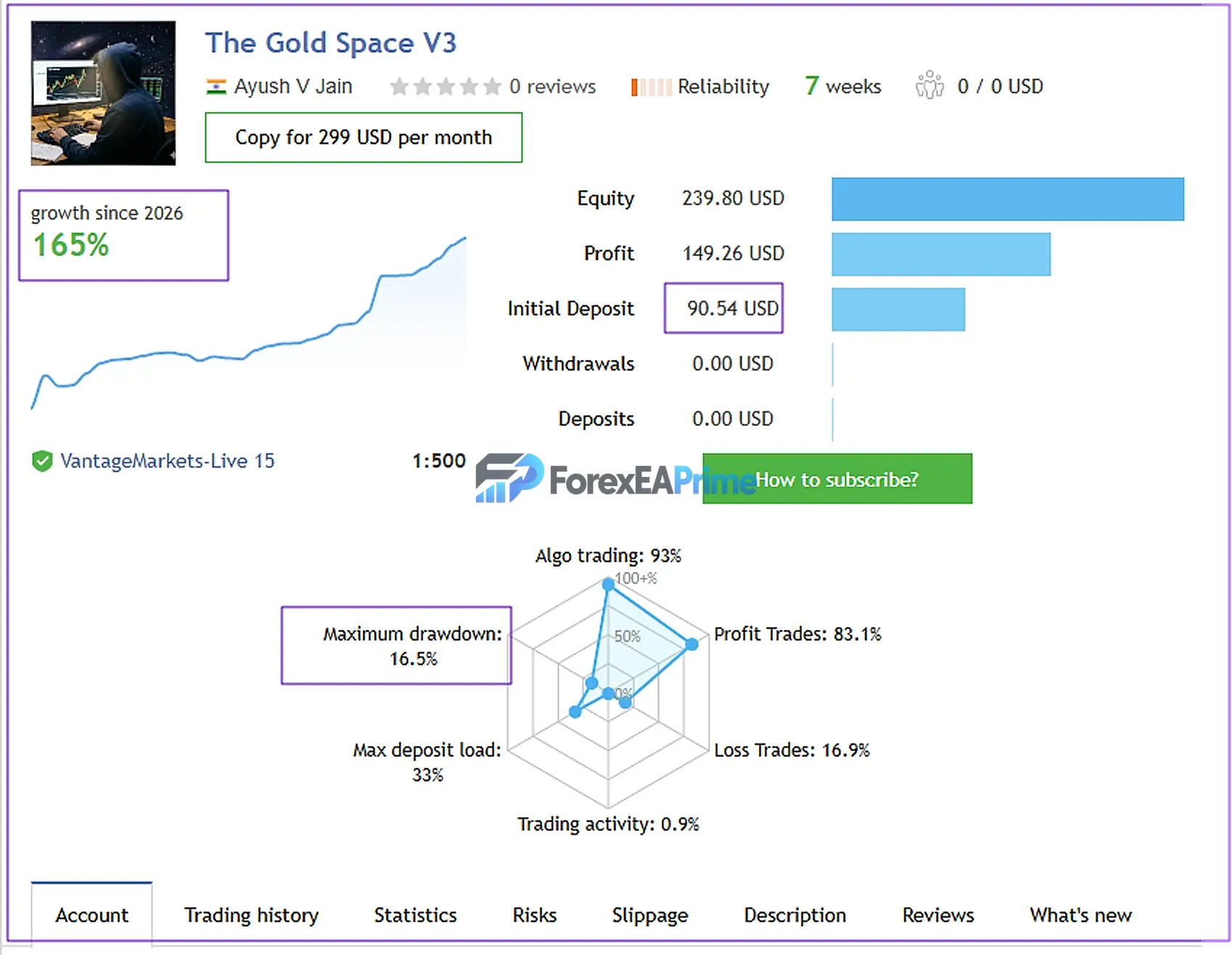
The MQL5 signal displayed the following figures when checked for this product review:
| Performance metric | Displayed result |
|---|---|
| Account growth | 164.86% |
| Initial deposit | $90.54 |
| Current equity | $239.80 |
| Net profit | $149.26 |
| Total trades | 83 |
| Winning trades | 69 |
| Winning trade percentage | 83.13% |
| Profit factor | 4.46 |
| Maximum relative balance drawdown | 16.55% |
| Maximum equity relative drawdown | 1.26% |
Important: These figures represent a short live monitoring period, not a long-term performance guarantee. MQL5 has also displayed warnings concerning high recent growth, the short signal history and possible negative slippage when copying trades.
Check the live signal directly for updated results, trading history and risk information.
View The Gold Space V3 Live Signal on MQL5
The Gold Space MT5 Backtest Results – V3.6
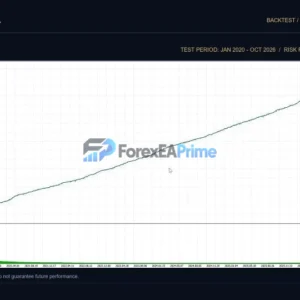
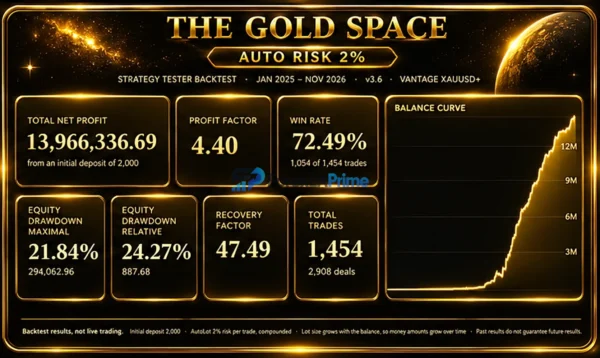
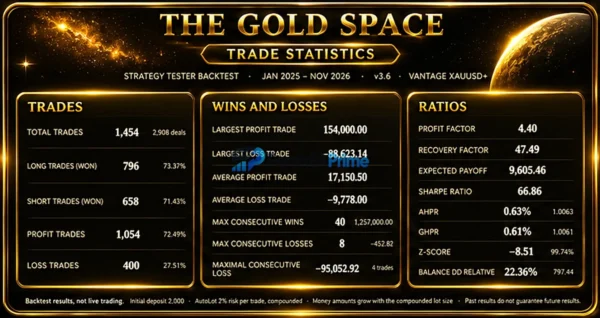
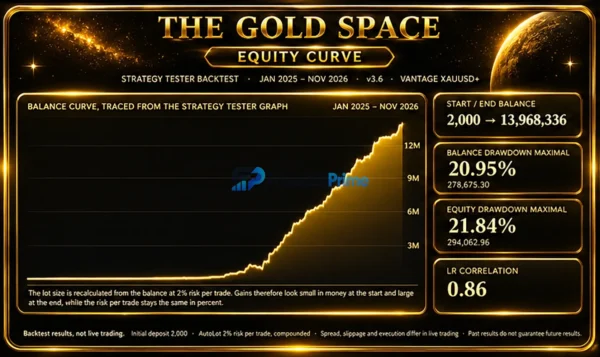
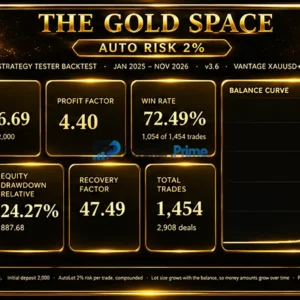
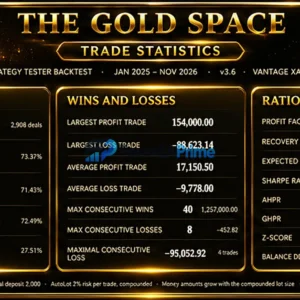
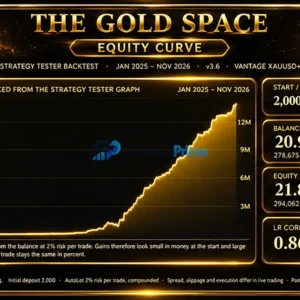
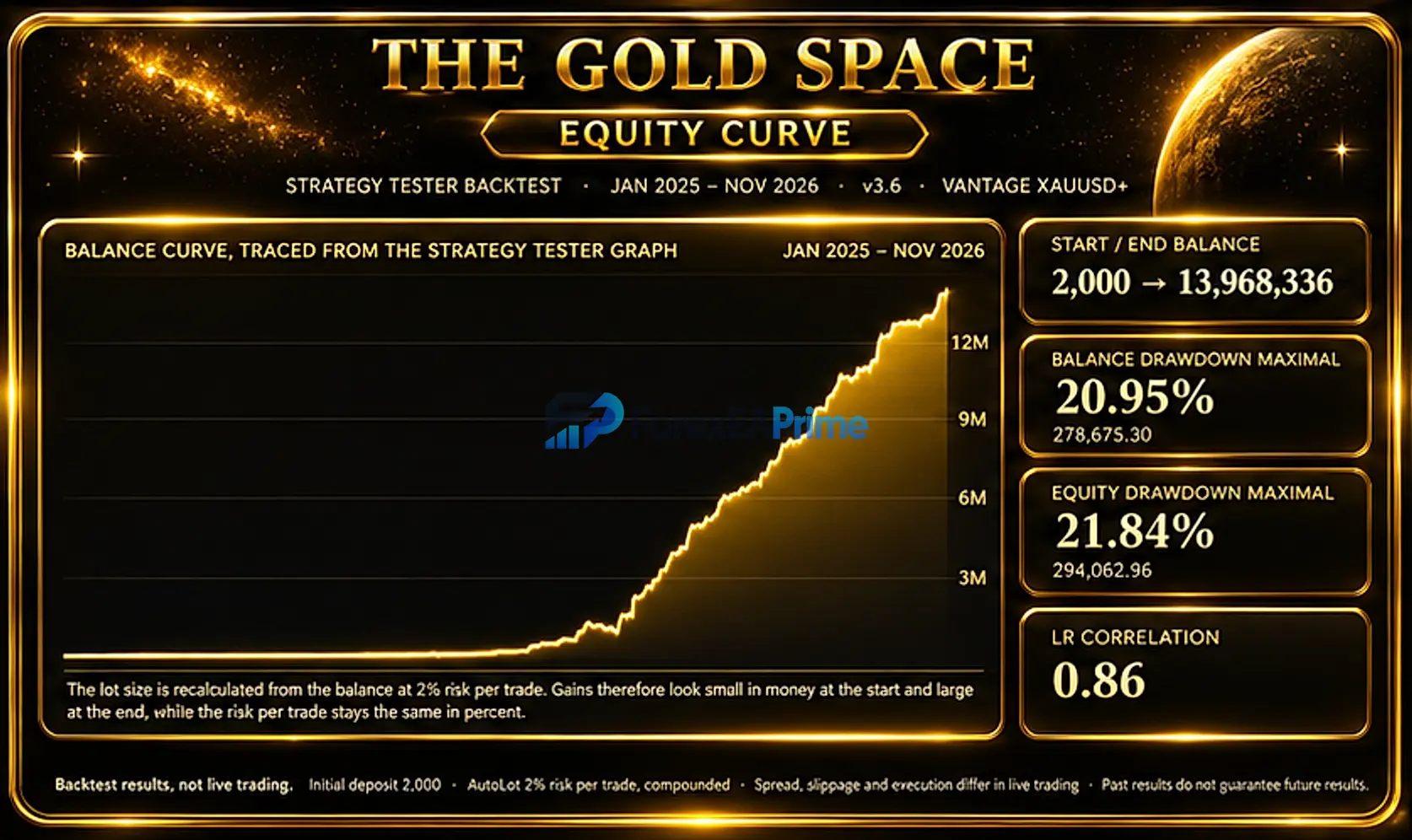
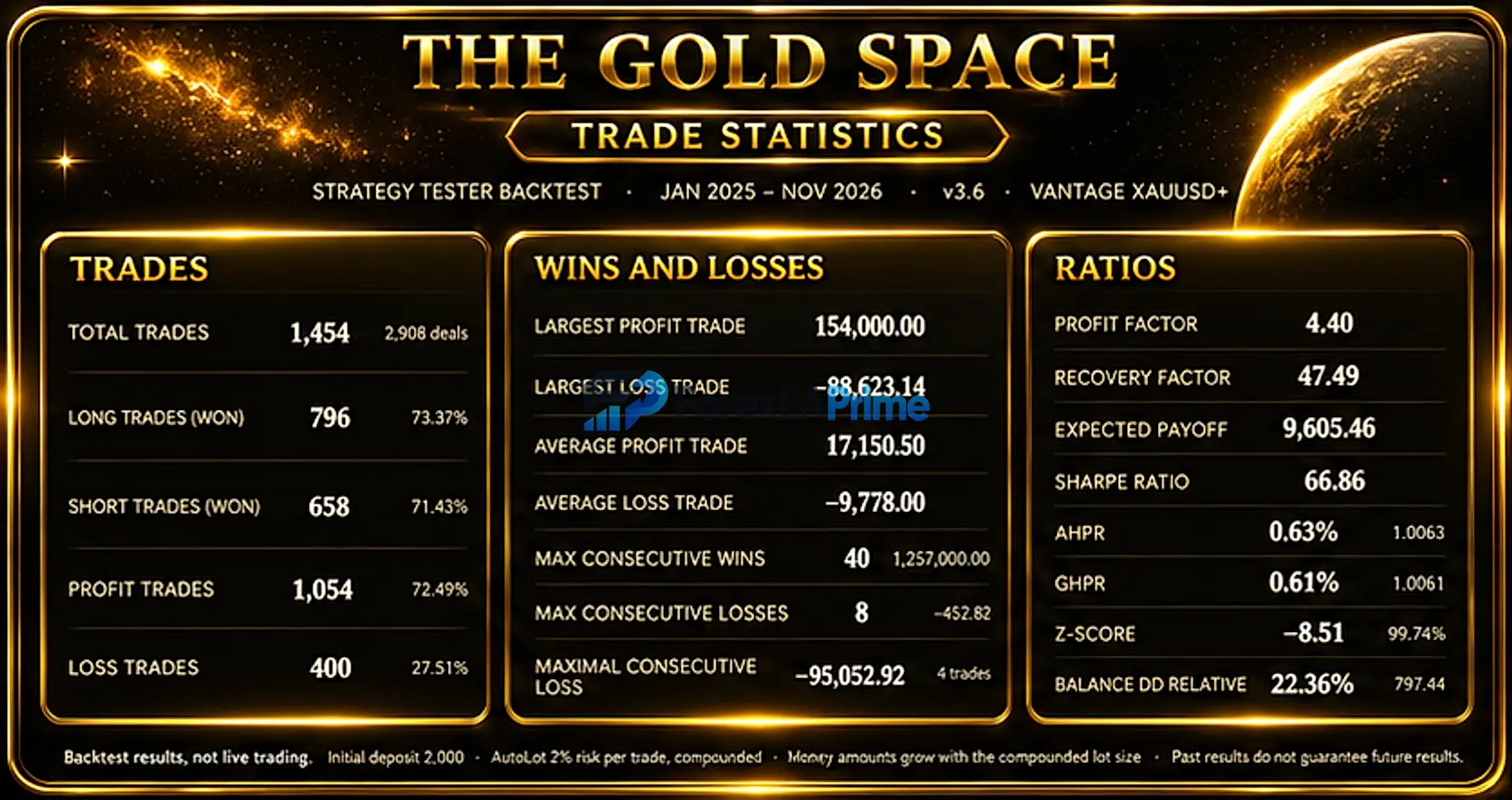
The supplied Strategy Tester report shows historical testing from January 2025 to November 2026.
The report identifies the following results:
| Backtest metric | Reported result |
|---|---|
| Initial deposit | $2,000 |
| Total net profit | $13,966,336.69 |
| Profit factor | 4.40 |
| Winning trades | 72.49% |
| Total trades | 1,454 |
| Maximum equity drawdown | 21.84% |
| Maximum balance drawdown | 20.95% |
| Recovery factor | 47.49 |
The supplied report uses automatic 2% risk per trade with compounding. Consequently, position sizes increase as the simulated account balance increases.
The large ending balance should not be interpreted as a typical expected return or a realistic earnings forecast.
These are seller-supplied historical backtest figures for V3.6, not verified live results for the current V3.7 release.
Actual trading performance depends on the broker, spreads, commissions, execution, slippage, leverage and account settings.
The Gold Space MT5 Settings and Configuration
The EA provides several configurable settings for traders who want to adjust how it operates.
| Setting | Official default or option |
|---|---|
| Fixed lot | 0.01 |
| Automatic risk | 2% |
| Risk calculation | Balance, equity or lower value |
| Stop Loss | 250 points |
| Take Profit | 4,000 points |
| Trailing mode | Automatic or manual |
| Maximum spread | 60 points |
| Maximum deviation | 30 points |
| Maximum positions per level | 4 |
| Optional M30 strategy | Off |
| FOMC filter | On |
| NFP filter | On |
| CPI filter | On |
| News pause | 60 minutes before and after |
These are the official documented defaults. They are not universal recommendations for every trading account.
Several strategies can hold positions at the same time. Therefore, total account exposure can exceed the risk assigned to an individual trade.
For beginners, starting with a small fixed lot on a demo account is preferable to immediately using aggressive percentage-based compounding.
Supported Platforms and Trading Requirements
| Requirement | Details |
|---|---|
| Trading platform | MetaTrader 5 |
| Trading instrument | XAUUSD |
| Gold price format | Two-digit and three-digit quotes |
| Broker symbols | Prefixes and suffixes supported |
| Chart setup | One XAUUSD chart |
| Chart timeframe | Any timeframe |
| Account type | Hedging account |
| Broker recommendation | Low-spread ECN or raw-spread conditions |
| Hosting | VPS recommended |
The internal strategies read their respective timeframes, so you do not need to attach the EA to several separate charts.
A stable internet connection and VPS are recommended to keep the trading terminal running and allow continuous trade management.
How to Install The Gold Space MT5
Follow these general installation steps:
- Open your MetaTrader 5 trading platform.
- Obtain the EA file through your authorized purchase or distribution method.
- Open the MT5 Data Folder.
- Navigate to MQL5 and then Experts.
- Place the EA file in the Experts directory.
- Restart MetaTrader 5 or refresh the Navigator window.
- Open an XAUUSD chart.
- Attach The Gold Space EA to the chart.
- Enable Algo Trading.
- Configure your lot size, risk and other settings.
- Verify the EA is operating correctly on a demo account.
Broker-specific configuration may be necessary. Check that your broker supports a hedging account and suitable XAUUSD trading conditions.
Who Should Consider The Gold Space MT5?
The EA may be worth evaluating if you:
- Trade gold and want an automated breakout approach.
- Prefer pending-order entries around swing levels.
- Want predefined Stop Loss and Take Profit levels.
- Prefer a strategy without martingale or grid recovery.
- Understand the risks of automated gold trading.
- Have experience with MetaTrader 5 and account risk management.
It may not be appropriate if you:
- Expect guaranteed profits.
- Cannot tolerate trading drawdowns.
- Want a risk-free trading system.
- Do not understand leveraged gold trading.
- Need a system that works without a continuously running trading terminal.
The Gold Space MT5 – Official Product and Live Performance Links
Before purchasing, we recommend checking the official developer listing and live monitoring information.
- Official The Gold Space MT5 product listing
- The Gold Space V3 live signal
- ForexEAPrime Telegram channel
- ForexEAPrime support
Explore More MT5 Expert Advisors
Looking for other automated trading systems? Explore more Expert Advisors from ForexEAPrime.
- MT5 Expert Advisors
- Low Drawdown Forex Robots
- Scalping Index Pro MT5
- Institutional SMC Robot MT5
- Hedgehog MT5
Get More Forex Trading Tools with ForexEAPrime VIP Membership
Want access to more Forex Expert Advisors, indicators and trading tools?
Explore the ForexEAPrime membership options to discover available VIP resources and membership benefits.
Explore ForexEAPrime VIP Membership
Join our community for product updates, new EA releases, trading resources and support.
Important Trading Risk Disclaimer
Forex and gold trading involve substantial financial risk. Automated Expert Advisors can experience losing trades, drawdowns, execution differences and unexpected market conditions.
Historical backtest performance is not a guarantee of future results. Live trading results may differ from backtests and from one broker to another.
Always test the EA on a demo account, use appropriate risk settings and trade only with money you can afford to lose.
ForexEAPrime – Forex Expert Advisors, MT4/MT5 Trading Tools and Resources.

Best Forex EA 2026
Select by algorithmic architecture, mathematical paradigm, and prop qualification parameters.